How to Obtain Okta AD Agent Certificate
Oct 2, 2025
Okta Classic Engine
Directories
Okta Identity Engine
Overview
In some Active Directory (AD) environments, well-known product certificates such as Okta's public certificates may not be automatically trusted. In such an environment, installer certificates may need to be manually trusted for installations to complete.
Applies To
- Directories
- Okta AD Agent
- Certificates
Cause
The Okta AD Agent installer file contains a certificate that must be trusted to be completed successfully.
If the AD environment does not automatically trust installer certificates, the Okta AD Agent installation will fail.
Solution
The installer certificate must be extracted from the installer file and trusted manually in the AD environment.
Obtain the Okta AD Agent installer certificate embedded in the installation file using the following steps.
- Download the latest version of the Okta AD Agent installer.
- Right-click the file, then click Properties.
- Click the Digital Signatures tab, then click Details.
- In the Digital Signature Details window, in the General tab, click View Certificate.
- In the Certificate window, click the Details tab, then click Copy to File...
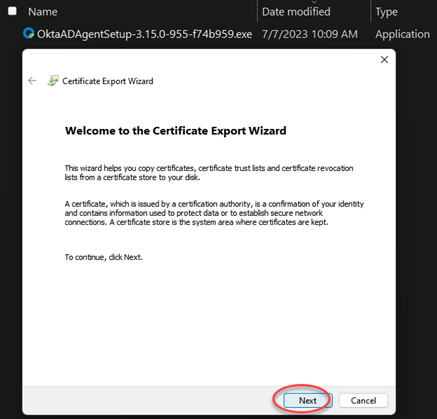
- This opens the Certificate Export Wizard. Click Next.
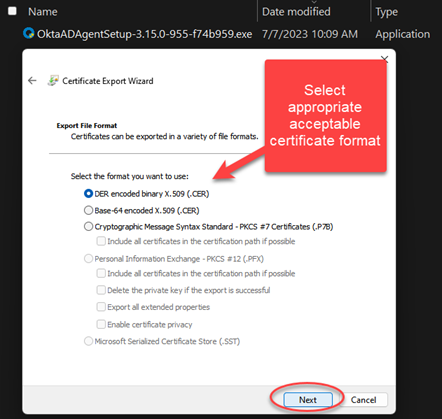
- Choose the appropriate certificate format for the environment, then click Next.
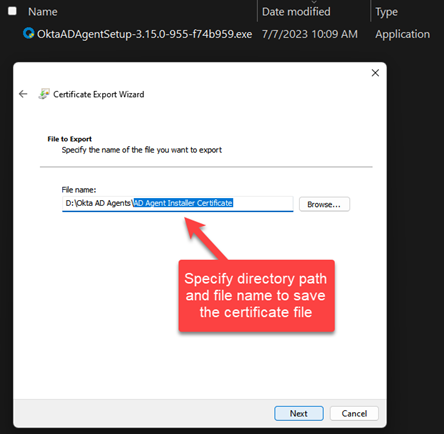
- Specify the file path and filename for the certificate file, then click Next.
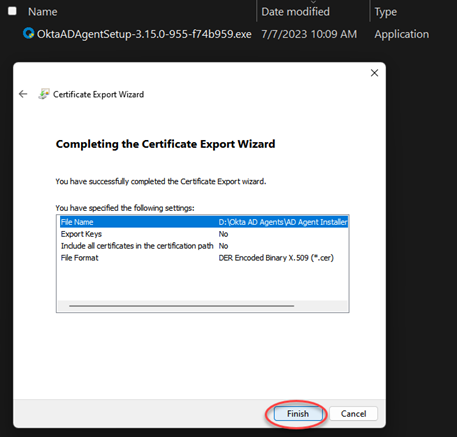
- Click Finish to complete the Certificate Export Wizard.
- Click OK.
After the certificate is successfully exported, take the appropriate environmental actions to trust this certificate.
Once the certificate is trusted, the AD Agent installation should be completed successfully.

