<iframe src="https://www.googletagmanager.com/ns.html?id=GTM-M74D8PB" height="0" width="0" style="display:none;visibility:hidden">
Loading
Skip to NavigationSkip to Main Content
0D5KZ00001IADKm0APOkta Classic EngineIntegrationsAnswered2025-09-19T17:16:36.000Z2025-09-08T11:40:39.000Z2025-09-19T17:16:36.000Z

DejanD.41425 (Customer) asked a question.

On-Prem OPP agent upgrade error 3 - V 3.0.02

While attempting to upgrade the OPP agent from 2.3.1 to 3.0.02 the install failed at the 85% mark and the error reads "Unable to activate the agent. error code: 3"


In previous upgrades this would be the part where the login prompt pops up and asks to connect the API. It does ask for the domain and proxy settings but never gets to load the login prompt.

 

/help/servlet/rtaImage?refid=0EMKZ000000ddWL


  • DejanD.41425 (Customer)

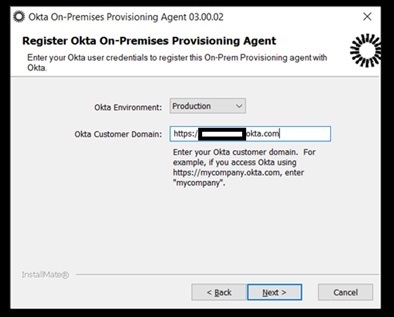
    Enter the entire FQDN, not just the subdomain and the install should complete. The prompt is wrong.OktaGUIError
    Selected as Best
  • User17157611498146715886 (Customer Support Online Community and Social Care)

    Hello @DejanD.41425 (Customer)​ , thank you for contacting Okta Community.


    The error code 3 could refer to a conflicting or outdated version interfering with the installation. Try to uninstall the Okta Provisioning Agent, reboot, and then install the new version. Please refer to this article:

    Uninstall and reinstall the Okta Provisioning Agent


    Regards. 

    --

    Help others in the community by liking or hitting Select as Best if this response helped you.

    Just released: More Okta Community badges just added

    Expand Post
  • DaltonS.84133 (Customer)

    I experience this same problem with the newer 3.00.03 version in our preview tenant as well.


    I confirmed that I've fully uninstalled the old agent and removed the files from the Program Data folder as specified in the article.


    Judging by the views on this post and only being 11 days old, I suspect more people are experiencing this as well.


    I get to exactly 85% and instead of prompting for the credentials with admin permissions to connect the API, it just fails with error code 3 every time.

    Expand Post
    • DaltonS.84133 (Customer)

      Also would like to note that I was able to roll back to my previous version without any issues at all.

  • DaltonS.84133 (Customer)

    This fixed the issue, I was met with the newer device activation settings instead of logging into my tenant with an admin privileged account.


    Thank you @DejanD.41425 (Customer)​!

  • DejanD.41425 (Customer)

    Enter the entire FQDN, not just the subdomain and the install should complete. The prompt is wrong.OktaGUIError

    Selected as Best
This question is closed.
Loading
On-Prem OPP agent upgrade error 3 - V 3.0.02