<iframe src="https://www.googletagmanager.com/ns.html?id=GTM-M74D8PB" height="0" width="0" style="display:none;visibility:hidden">
Loading
Skip to NavigationSkip to Main Content
0D54z00006uP9odCACOkta Classic EngineAdministrationAnswered2024-05-16T20:04:45.000Z2021-04-05T18:26:36.000Z2021-04-14T19:20:08.000Z
  • RobertV.62424 (Customer)

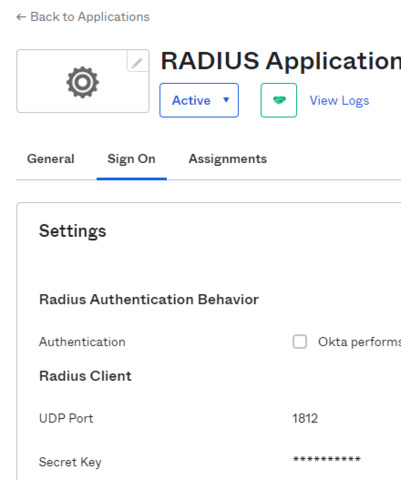
    The solution to this was to log into the Okta Admin, and go to Applications, and then change the setting under the Radius Authentication appradius
    Selected as Best
  • w2wi2 (w2wi2)

    Hi Robert, you can find the shared secret field on the Okta Radius Agent as seen in the capture below

    • Unknown file type
      The file is no longer available.
  • RobertV.62424 (Customer)

    The solution to this was to log into the Okta Admin, and go to Applications, and then change the setting under the Radius Authentication appradius

    Selected as Best
This question is closed.
Loading
Windows Okta Radius Agent Secret Settings
Okta Support Agent (Beta)

Terms of Service

Hello! I'm the Okta Support Agent (Beta), your go-to resource for questions about Okta products. Please remember for your security and privacy, do not share any Personally Identifiable Information (PII) such as passwords, IP addresses, or other details with me.

Okta Privacy Policy and Terms of Service apply
