How to Subscribe To and Follow Okta Access Requests
Oct 9, 2025
Identity Governance
Okta Classic Engine
Okta Identity Engine
Overview
There may be situations where individuals other than the requestor, request assignee, approver, or task owner would like to monitor the progress or status of a submitted request for visibility purposes. This can be accomplished using Okta Access Request's "Followers" feature within the submitted request.
To update who can follow/subscribe to updates on the request, the Request Assignee needs to update the "Followers" field. At the moment, this can only be performed within the Okta Access Request console or web interface.
Followers are not notified of all updates, but they are notified when they are added as followers and when the request is resolved.
Applies To
- Okta Identity Governance
- Access Requests
Solution
- As the Request Assignee, navigate to an open or pending access request within the Okta Access Request web console. General information about the request is seen at the top of the request.
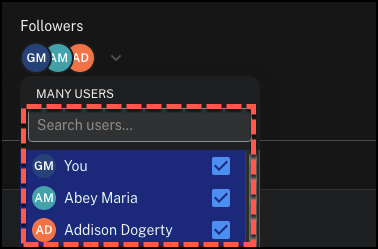
- Under the Followers section, click on the dropdown arrow to reveal a list of users and a search field.
- Search or select individual(s) that should be subscribed to the ticket by clicking the checkbox next to their name. When done, click outside the dropdown box.