
NeilO.24737 (DigitalFish) asked a question.
Box provisioning supports creating a user folder with a custom name, but NOT with profile mappings. Why not?
We want our user folders in Box to be a custom name: "${user.friendlyName} ${user.lastName}" but the app integration supports only certain attributes in that expression and friendlyName isn't one of them.
So fine, we have edited the Box user profile mapping so that every user has user.friendlyName mapped to their firstName attribute in the Box profile. Finally we updated the custom folder expression be "${user.firstName} ${user.lastName}"
Unfortunately, this doesn't work. Even with this configuration, when a new user "Robert Smith" is provisioned their profile is "Bob Smith" but their user folder is "Robert Smith", the formal name. Why? What other option do we have?


Hi @NeilO.24737 (DigitalFish) , Thank you for reaching out to the Okta Community!
That syntax formatting looks outdated to me. Please share the doc you are leveraging for that so we can review and maybe update it if needed.
In the meantime, please leverage the Okta Expression Language doc for syntax referencing.
If I'm understanding your requirement correctly, you should be using something like
user.friendlyName + " " + user.lastName
If my answer helped, remember to mark it as best to increase its visibility for other members of the Okta Community who might have the same questions as you.
Hope my answer helps!
--
Help others in the community by liking or hitting Select as Best if this response helped you.
Collect them all. Learn a new skill and earn a new Okta Learning badge.
Just released: More Okta Community badges just added
In the Okta admin console (and assuming you have the Box integration), go to Applications > Box > Provisioning > To App. Then click "Edit" and look under the "Personal folder name format" field there is a link "Format default folder name based on a custom expression". Click that link, and the banner at the top of that modal dialog is the warning:
"Please note that the scope of properties you can use in custom expression is limited to the following properties: user.login, user.email, user.firstName, user.lastName.
If you want to use more properties or need more flexibility, please use Profile Editor."
Below that, the instructions are:
"Use the following syntax to reference an expression: ${expression}"
And that's just what I'm doing.
Later in the same dialog (you have to scroll to the bottom) is an example almost identical to what I'm doing: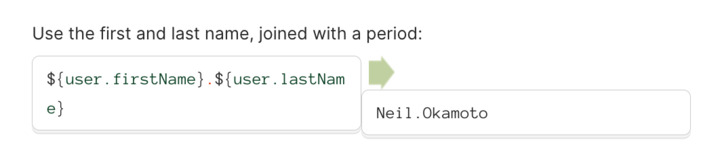
Note that my issue is NOT with this syntax. I am getting a folder named with a first and last name, but what I'm getting is the value from the Okta profile BEFORE the Box user profile mapping is applied. So as I said, for a user named "Robert Smith" with the friendlyName "Bob", I am expecting their user folder to be provisioned with the folder name "Bob Smith". But that's not happening.
Hi @NeilO.24737 (DigitalFish) If you have an account with us and are a SuperAdmin/Case Admin, please open a case to work with my colleagues from the Support Team to investigate this further. They'll be able to access additional tools and resources to help you get to the bottom of it.
Regards.
--
Help others in the community by liking or hitting Select as Best if this response helped you.
Collect them all. Learn a new skill and earn a new Okta Learning badge.
Just released: More Okta Community badges just added
ok, and done. case opened.