Skip Processing a Record From a List in Workflows
Last Updated:
Overview
This article will teach you to skip processing a special record from a list in Okta Workflows.
Solution
You process a list of users. There are special users (such as service accounts) you need to skip processing.
This example will use numbers to demonstrate this use case.
The first flow sets up a list of numbers. It must skip processing negative numbers and pass the numbers to a helper flow.

Set up number list flow.
The helper flow checks if a number is negative and skips processing such a number.
This solution assumes the number of special numbers is small and keeps the numbers to skip in the flow using the List – Includes card.
The flow checks every number against the special numbers (negative numbers). If it finds a special number, the Continue If card stops flow processing. If it is not a special number, the processing continues.
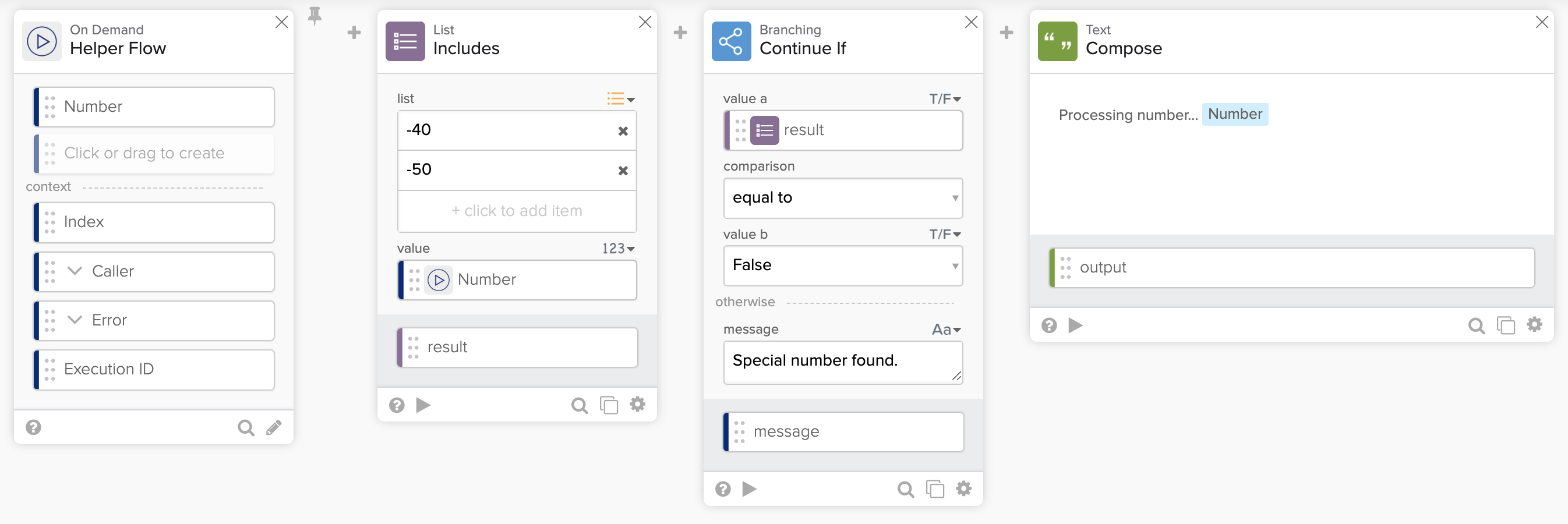
Check for special numbers.
The following screenshots show running the flow.
The Compose card shows the flow processing a regular number.

Processing a regular number.
The flow processed a special number. The flow didn’t run the Compose card.

Processing a special number.
Get the flows
Download the flows.

