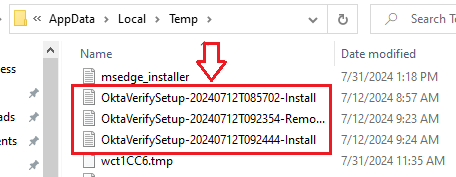
Okta Verify for Windows Installation Logs
Jan 6, 2026
Okta Device Access
Devices and Mobility
Multi-Factor Authentication
Okta Identity Engine
Overview
How to locate Okta Verify for Windows Installation Logs.
Applies To
- Okta Verify
- Windows
- Okta Identity Engine (OIE)
- Multi-Factor Authentication (MFA)
Solution
- Navigate to the location where Okta Verify Logs are generated using one of the approaches below:
- Option 1: Right-click on the Windows Start button, click Run, and enter %tmp%.
- Option 2: In the Windows Explorer Address Bar, enter %tmp%.
- In the newly opened windows, look for files with Okta_Verify*** filenames.
- The location would be C:\Users\[UserName]\AppData\Local\Temp.
For example, C:\Users\Jennifer.Jones\AppData\Local\Temp.