Create and Validate JSON Input in Okta Workflows
Last Updated:
Overview
This guide shows how to create and validate JSON input in Okta Workflows.
This guide focuses on validation. To learn how to create JSON data, read the How to Create JSON Data in Okta Workflows guide.
Solution
When building a flow (or cards) where JSON is an input (such as the Slack Block UI or Microsoft Teams message), it is recommended to use the Object — Construct (or List—Construct) cards instead of the Text—Compose card.
To validate the following JSON before using it in an API request:
{
   "subject": "🚨 User Activated",
   "body": {
      "contentType": "html",
      "content": "<b>Sara August</b> (<u>asara</u>),  <i>President</i>."
   }
}
Validating this JSON is a good idea since a missing bracket (or similar) can cause the API request to fail.
Use the Object – Construct card
The Object—Construct card can create a valid JSON object. NOTE: Nested keys can be created, such as body.content.

Validating JSON with the Object – Construct card.
Testing the Object – Construct card produces the following valid JSON object:

Testing the Object – Construct card.
If the block fields are populated by user input of any kind, someone can input JSON and alter the JSON schema itself. This usually breaks the JSON, but it can also change the blocks entirely. Unlike the Text—Compose card, the construct cards will correctly sanitize and validate inputs.
The following flow uses Object—Construct and Text—Compose cards to create a JSON object. At the end, the JSON—Parse card validates the JSON from the Compose card.
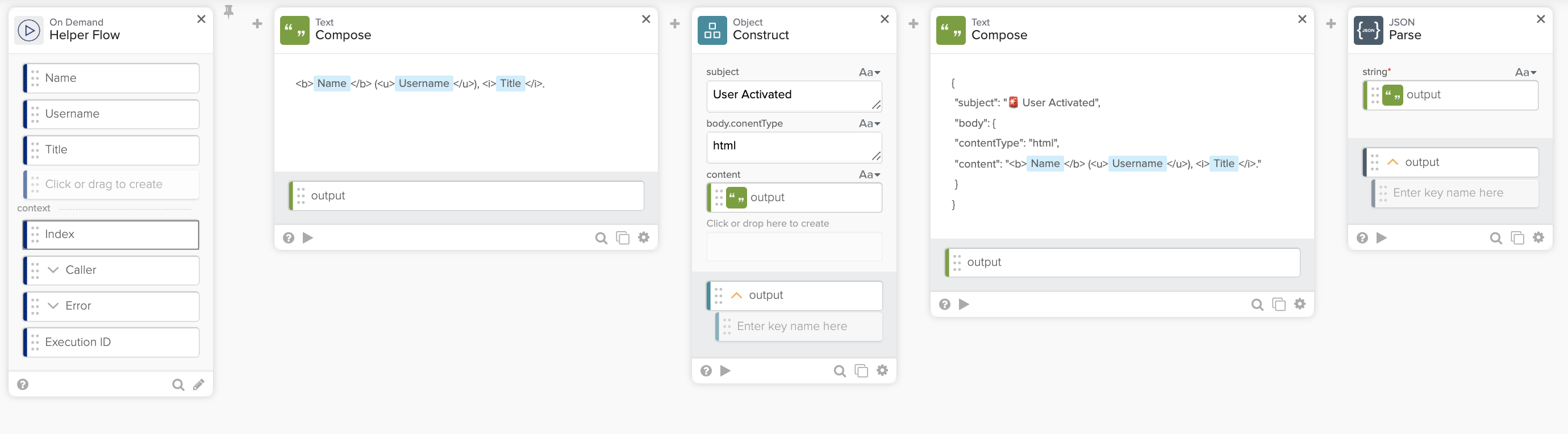
Validating JSON.
The following flow runs with three text inputs (Sara August, asara, and President):

Running the flow with text inputs.
The next run shows entering {“Title”:”President”} for the Title input. The Object—Construct card creates a valid JSON, while the Text – Compose card does not create a valid JSON.

Running the flow where one input is a JSON value.
Use the JSON—Parse card
If working with a lot of JSON data, use the JSON—Parse card to validate it.
The following is an example of validating JSON using the JSON—Parse card before sending an API request.

Validating JSON with the JSON—Parse card.
If the JSON is invalid (missing a comma after the User Activated value), the following error will be shown:

Invalid JSON error.
Related References

