Create an Object With the Object – Map Card in Workflows
Last Updated:
Overview
This knowledge base article will demonstrate how to iterate over object keys and create a new object using the Object – Map card.
Solution
Start with the following object:
 {
   "drink": "wine",
   "main course":"fish",
   "appetizer":"salad",
   "dessert":"ice cream"
}
A new object that looks like this is needed. Instead of a string, the value is also an object.
{
  "drink": {
    "Item": "wine",
    "Price": "$8"
  },
  "main course": {
    "Item": "fish",
    "Price": "$20"
  },
  "appetizer": {
    "Item": "salad",
    "Price": "$10"
  },
  "dessert": {
    "Item": "ice cream",
    "Price": "$7"
  }
}
Using the Object – Map card
The Object – Map card iterates over object keys and returns a new object.
The main flow looks like this:

Using the Object – Map card.
The flow has the following steps.
Create the JSON object
The Compose card creates the JSON object.
Validate the JSON
The JSON – Parse card is optional but validates the JSON object is valid.
Process the object
The Object – Map card iterates over the object keys using a helper flow. The card passes each key and value to the helper flow.
After the card processes all the keys, it returns a new object (output field).
Helper flow
The following is the helper flow.
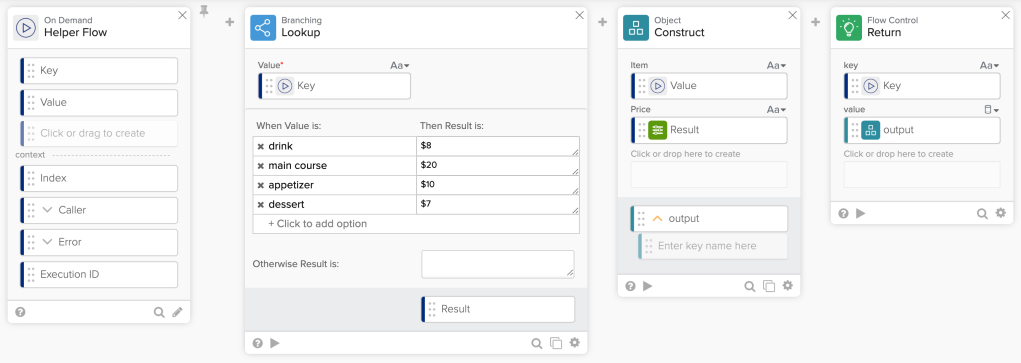
Helper flow.
The helper flow has the following steps.
Input
The helper flow receives each key and value in the object.
Lookup pricing information
The flow uses the Lookup card to match a food item with price.
Set up new value
The Construct card creates a new object with Item and Price information. The object looks like this:
 {
    "Item": "wine",
    "Price": "$8"
 }
Return new key/value
The Return card returns a new key/value to the main flow. Each new key/value looks like this:

New key/value.
The original value was a text. The new value is an object.
Result
Running the flow:

Running the flow.
The Object – Map returns a new object.
{
  "drink": {
    "Item": "wine",
    "Price": "$8"
  },
  "main course": {
    "Item": "fish",
    "Price": "$20"
  },
  "appetizer": {
    "Item": "salad",
    "Price": "$10"
  },
  "dessert": {
    "Item": "ice cream",
    "Price": "$7"
  }
}
Related References

