How to Delete a Factor Using Postman API
Last Updated:
Okta Classic Engine
Multi-Factor Authentication
Overview
Applies To
- Postman
- Factors Collection
- Users Collection
- Okta Classic Engine
Solution
- Install and configure Postman.
-
Import the Postman Users and Factors Collection.
-
Obtain the
${userId}as documented. -
Obtain the
${factorId}as documented.
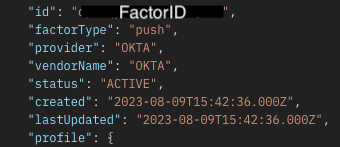
In the response, the FactorID will be in this form.
-
Delete the factor associated with the specified use as documented.
NOTE: The endpoint will reject the DELETE call if the factor being deleted is not in ACTIVE or PENDING_VERIFICATION state.

